It’s 2:15 AM on a Wednesday. Your phone buzzes on the nightstand.
A client’s high-traffic WooCommerce store is throwing 502 Bad Gateway errors. You tumble out of bed, wait for your laptop to wake up, authenticate through your VPN, SSH into the origin server, and run top only to find that an automated nightly backup collided with a rogue WP-Cron process, consuming 98% of the server’s RAM and sending PHP-FPM into an OOM (Out-of-Memory) crash loop.
You restart PHP-FPM, verify Nginx is responding, check site response times, close your laptop, and try to get back to sleep. Total engineering time spent: twenty minutes. Loss of sleep: priceless.
If your agency manages dozens or hundreds of client WordPress sites across dedicated VPS infrastructure (SpinupWP, GridPane, Pressable, Cloudways, DigitalOcean, Hetzner, Vultr, Linode, or AWS), these 2:00 AM server spikes are an ongoing tax on your team’s sanity.
With Clockwork Control v1.9.0, we’re fixing that fundamentally.
We are thrilled to announce AiRemedy (Self-Healing Servers), our native incident triage and autonomous recovery engine powered by Anthropic’s Claude Sonnet 4.5 via OpenRouter. Alongside AiRemedy, v1.9.0 delivers a universal ⌘K QuickJump search palette, a comprehensive Fleet Updates & Reboot Engine, a visual Feedback & In-App Collaboration module, and deep platform security hardening.
Here is an in-depth look at what Clockwork Control v1.9.0 brings to your agency.
1. Introducing AiRemedy: Self-Healing Infrastructure for Agency Fleets
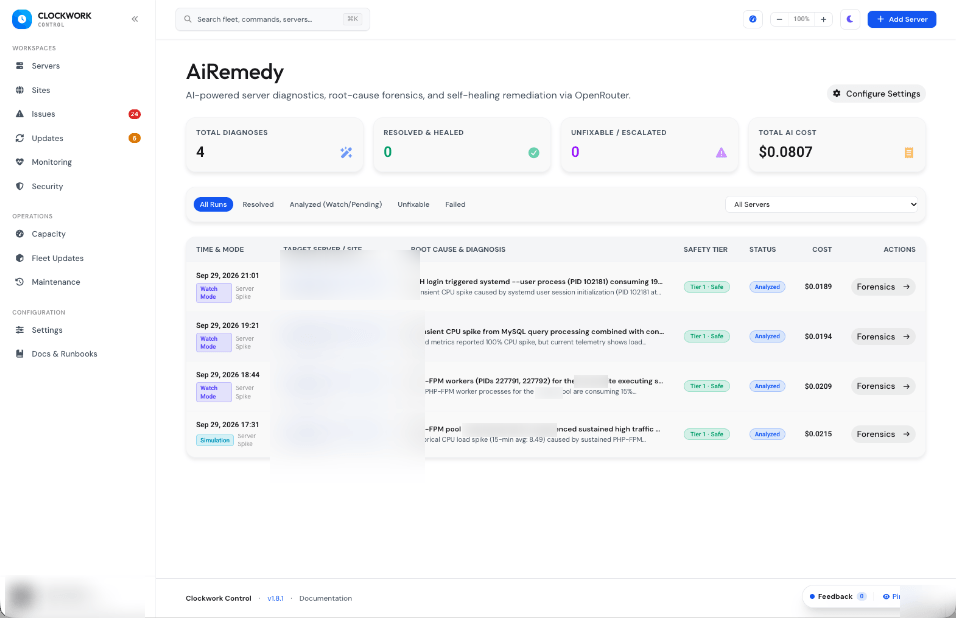
Most server monitoring tools merely sound an alarm when a threshold is breached. They email you a generic notice saying “Server CPU > 90%” and leave the rest to human deduction.
AiRemedy does what an experienced Linux systems engineer would do the moment an alert fires:
- Securely establishes an SSH connection to the distressed server.
- Captures an instant, non-invasive telemetry diagnostic bundle (
uptime,free -m,df -h,ps aux --sort=-%cpu,ps aux --sort=-%mem,journalctl -u php*-fpm -n 40,tail -n 50 /var/log/nginx/error.log). - Scrubs the telemetry through a local privacy filter, stripping private keys, passwords, and tokens.
- Feeds the structured forensic evidence to Claude Sonnet 4.5 via OpenRouter.
- Produces an immediate, plain-English root cause analysis with confidence scores, recommended remediation commands, and risk classifications.
- Depending on your agency’s configured safety policies, AiRemedy either notifies your team with a 1-click execution drawer or safely applies the fix autonomously.
2. Engineered for Agency Safety: Zero-Risk Architecture
Allowing an AI model anywhere near production servers sounds terrifying if done recklessly. We spent weeks designing AiRemedy specifically to ensure it can never harm client workloads:
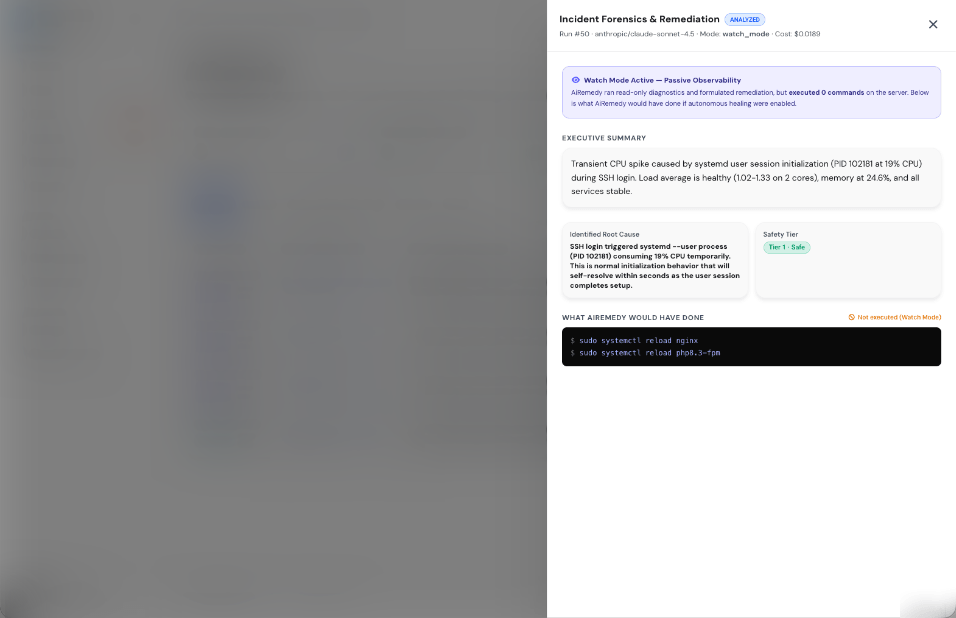
A. Shadow Mode (watch_mode) by Default
When you enable AiRemedy in Clockwork Control, it launches in Shadow Mode (Watch Mode). In Shadow Mode, AiRemedy performs 100% of the forensic diagnosis, captures the telemetry bundle, classifies root causes, and computes recommended commands—without executing a single command on your infrastructure. Your team can observe its reasoning on real-world incidents, gain confidence in its recommendations, and graduate to autonomous action only when ready.
B. 3-Tier Safety Matrix & Permanent Security Floor
Not all remediation actions carry equal risk. Under Settings → AiRemedy, operators configure an interactive Kanban-style Safety Matrix organizing standard remediation commands across three tiers:
- Tier 1 (Safe / Autonomous): Read-only checks and graceful daemon restarts (
systemctl restart php8.3-fpm,systemctl reload nginx, clearing WordPress object caches). Allowed to run automatically when fully enabled. - Tier 2 (Cautious / One-Click Approval): Impactful operations requiring explicit human confirmation via the interactive drawer (
systemctl restart mysql, killing individual rogue worker processes, tuning process priority). - Tier 3 (Prohibited / Blocked): Destructive actions that Clockwork Control will never execute under any circumstance.
Crucially, Clockwork Control enforces a Permanent Security Floor: high-hazard patterns such as rm -rf /, mkfs, fdisk, DROP DATABASE, curl | bash, chmod 777, and modifications to /etc/sudoers are permanently locked 🔒 in Tier 3. They cannot be moved, overridden, or unlocked through the UI or API.
C. Independent Backend Safety Validation (Eliminating LLM Trust Inversion)
Clockwork Control never trusts the AI model’s self-certified safety tier. Even if an LLM marks a proposed action as “Safe,” our backend CommandSafetyGuard independently validates the raw shell string using strict ^...$ regex patterns, enforcing metacharacter bans (;, &, |, $, `, >, <, \n) and deterministic allowlists. If a command doesn’t match an approved pattern, execution is strictly blocked.
D. Allowed Maintenance Workload Recognition
Agency servers regularly run heavy background maintenance: SpinupWP rclone S3 backups, mysqldump exports, logrotate, and scheduled index optimizations. These tasks spike CPU and I/O for 5–10 minutes, generating false-positive panic alarms in traditional monitoring.
AiRemedy automatically recognizes verified maintenance signatures. It tags the incident with an Allowed Maintenance status badge and provides an option to mute notification spam in Slack and Mattermost. Furthermore, instead of abruptly killing a backup and corrupting client archives, AiRemedy suggests non-destructive priority adjustments:
# Non-destructive CPU & I/O deprioritization
sudo renice -n 19 -p 4821
sudo ionice -c 3 -p 4821
E. Continuous Server Spike Watchdog
In addition to reacting to HTTP downtime events, Clockwork Control v1.9.0 introduces the clockwork:watch-server-spikes console watchdog. It analyzes 5-minute rolling averages across all connected servers for sustained CPU saturation (>85%), memory exhaustion (>90%), and disk filling (>95%), triggering forensic triage before sites experience fatal 502 gateway timeouts.
F. Cooldown & Denial-of-Wallet Guardrails
To prevent runaway triage loops and API billing surprises during sustained hardware degradation, AiRemedy enforces an automated cooldown engine (default: 30 minutes per server). Average triage runs cost less than half a cent (~$0.003 - $0.008) via OpenRouter, with real-time token and sub-penny cost tracking displayed directly in the incident logs.
3. Universal QuickJump (⌘K / Ctrl+K)
Navigating across an agency command center with dozens of servers, hundreds of WordPress sites, client portals, and diagnostic tools should take milliseconds, not mouse clicks.
In Clockwork Control v1.9.0, pressing ⌘K (Mac) or Ctrl+K (Linux/Windows) anywhere in the application opens QuickJump:
┌─────────────────────────────────────────────────────────────┐
│  🔍  Search servers, sites, modules, runbooks... (⌘K)       │
├─────────────────────────────────────────────────────────────┤
│  ⚡ SITES                                                   │
│  acme-corp.com          SpinupWP · Production · PHP 8.3     │
│  bakerystudio.org       Pressable · Staging · PHP 8.2       │
│                                                             │
│  🖥️ SERVERS                                                 │
│  app-server-01          142.93.x.x · Hetzner Ashburn        │
│  db-replica-02          198.51.x.x · Vultr Atlanta          │
│                                                             │
│  🛠️ QUICK ACTIONS                                          │
│  AiRemedy Dashboard     /ai-remedy                          │
│  Fleet Update Manager   /operations/updates                 │
│  Emergency Runbooks     /docs/runbooks                      │
└─────────────────────────────────────────────────────────────┘
QuickJump features instant fuzzy search, arrow-key navigation, keyboard shortcuts, and deep indexing across sites, servers, settings, modules, runbooks, and API documentation.
4. Fleet Updates, Server Patching & Reboot Engine
Keeping server operating systems and PHP runtimes patched across an entire agency fleet is critical for security compliance, but tracking which servers need routine package updates versus full system reboots has historically been confusing.
In Clockwork Control v1.9.0, we overhauled the server patching architecture:
- Clean Metric Disambiguation: Resolved counter ambiguity across server headers and fleet overviews between “Patches Available” (security/package updates) and “Reboot Required” (
/var/run/reboot-required). - Batch Package Inspection: Inspect pending APT package lists directly from the web UI before applying updates.
- Dedicated Maintenance History Log: Centralized timeline at
/operations/maintenance-historytracking update runs, package diffs, execution durations, and reboot verifications. - Automated Post-Reboot Health Verification: When a server is rebooted through Clockwork Control, the system automatically runs post-boot SSH connectivity checks, validates web server and database daemon statuses, and verifies site response codes before marking the server green.
5. Visual Feedback & In-App Collaboration Module (modules/Feedback)
When team members, QA testers, or agency project managers review client sites or explore the command center, coordinating UI feedback through screenshots and chat threads is tedious and prone to miscommunication.
Clockwork Control v1.9.0 ships with our official Visual Feedback & In-App Collaboration Module:
- Right-Click Contextual Annotation: Right-click any UI element across the control panel to drop an interactive numbered visual pin (
①,②,③). - Deep Technical Context Capture: Automatically bundles the current route, controller action, target Blade view, CSS selector path, HTML tag, element text snippet, viewport dimensions, user info, and theme mode.
- Threaded Discussions: Team members can discuss design adjustments, track resolution statuses (
Open,In Progress,Resolved,Dismissed), and review changes in an Atarim-style popover. - Centralized Feedback Backlog: Manage all pins and discussions in a searchable, filterable backlog at
/feedback. - One-Click “Copy Claude Prompt”: Click a single button on any feedback item to generate a complete, structured Markdown prompt containing the exact code files, selectors, user comments, and context—ready to paste directly into Claude or Antigravity for instant implementation.
Like all Clockwork Control modules, the Feedback module is completely toggleable in Settings → Modules. When disabled, zero overlay markup, zero right-click listeners, and zero API endpoints are active.
6. Fleet-Wide Security Hardening & Developer Experience
Clockwork Control v1.9.0 also includes comprehensive security hardening across the platform:
- Universal Web & CSRF Middleware: Attached
webandactivemiddleware groups across all routes inmodules/CodeSnippets,modules/ClientManagement,modules/SiteMaintenance, andmodules/CommentModeration, ensuring CSRF token validation and account status checks are strictly enforced across all modular actions. - Installer Gate Auto-Sealing: Hardened
EnforceInstallerGate.phpso unauthenticated visitors cannot access setup wizard routes (/install/*) if active user accounts exist in the database, automatically resealing the gate sentinel unless explicitly unlocked viaphp artisan installer:reopen. - Public Report Token Rate Limiting: Enforced
throttle:60,1onGET /reports/view/{token}inmodules/ClientReportsto prevent token enumeration. - Bundled Apache ECharts: Completely eliminated third-party CDN scripts (
cdn.jsdelivr.net) from all charting surfaces, bundling tree-shaken Apache ECharts directly into the application assets for enhanced privacy and air-gapped reliability. - Sub-60ms Developer Gates: Integrated Biome for lightning-fast frontend formatting and linting alongside Pint, PHPStan, and TypeScript compiler checks.
7. What’s in the v1.9.0 Release
AiRemedy Self-Healing
Continuous spike watchdog, Claude Sonnet 4.5 root-cause analysis, 3-tier safety matrix, and allowlist-guarded SSH execution.
<div class="glass-card rounded-2xl p-5 border border-blue-500/20 bg-blue-500/5">
	<div class="flex items-center gap-3 mb-2">
		<div class="w-8 h-8 rounded-lg bg-blue-500/10 border border-blue-500/20 flex items-center justify-center text-blue-400">
			<i class="fa-solid fa-magnifying-glass text-sm"></i>
		</div>
		<h4 class="font-display font-bold text-white text-base">Universal QuickJump (⌘K)</h4>
	</div>
	<p class="text-xs text-white/70 leading-relaxed">Instant keyboard search palette indexing all sites, servers, settings, tools, runbooks, and documentation articles.</p>
</div>

<div class="glass-card rounded-2xl p-5 border border-emerald-500/20 bg-emerald-500/5">
	<div class="flex items-center gap-3 mb-2">
		<div class="w-8 h-8 rounded-lg bg-emerald-500/10 border border-emerald-500/20 flex items-center justify-center text-emerald-400">
			<i class="fa-solid fa-arrows-rotate text-sm"></i>
		</div>
		<h4 class="font-display font-bold text-white text-base">Fleet Updates & Reboot Engine</h4>
	</div>
	<p class="text-xs text-white/70 leading-relaxed">Package update inspection, batch patching, reboot requirement tracking, and centralized maintenance history logs.</p>
</div>

<div class="glass-card rounded-2xl p-5 border border-amber-500/20 bg-amber-500/5">
	<div class="flex items-center gap-3 mb-2">
		<div class="w-8 h-8 rounded-lg bg-amber-500/10 border border-amber-500/20 flex items-center justify-center text-amber-400">
			<i class="fa-solid fa-comment-dots text-sm"></i>
		</div>
		<h4 class="font-display font-bold text-white text-base">Visual Feedback Module</h4>
	</div>
	<p class="text-xs text-white/70 leading-relaxed">Point-and-click UI pin annotations, threaded team discussions, and one-click Claude prompt generation for rapid bug fixes.</p>
</div>
8. Upgrading to Clockwork Control v1.9.0
Clockwork Control v1.9.0 is available immediately on GitHub for all self-hosted agency installations.
To update your existing Clockwork Control instance:
# Navigate to your Clockwork Control installation
cd /var/www/clockwork-control

# Fetch latest releases and checkout v1.9.0
git fetch origin --tags
git checkout v1.9.0

# Install dependencies and run migrations
composer install --no-dev --optimize-autoloader
php artisan migrate --force

# Clear and rebuild application caches
php artisan optimize:clear
php artisan optimize

# Restart background queue workers
php artisan queue:restart
To configure AiRemedy, navigate to Settings → AiRemedy in your dashboard, enter your OpenRouter API key, review your Safety Matrix tier preferences, and keep Shadow Mode enabled while your team evaluates forensic triage logs.
Full technical documentation and runbooks are available in the AiRemedy Documentation and OpenRouter Integration Guide.
Clockwork Control is the self-hosted, modular command center built specifically for WordPress agencies managing client fleets on SpinupWP, Pressable, WP Engine, Kinsta, Cloudways, DigitalOcean, Hetzner, Vultr, Linode, and AWS.
