The Zero-Bloat Companion
for Agency WordPress Fleets
Traditional SaaS worker plugins pollute client databases, run background cron jobs, and phone home to third-party clouds. Clockwork Companion is a single-file Must-Use plugin that executes cryptographically signed commands only when your control panel asks.
Inside the Clockwork Companion Interface
Clean, white-labeled, and completely sandboxed. Explore authentic 2x retina captures from an active production installation running Clockwork Companion across all 9 operational hubs.
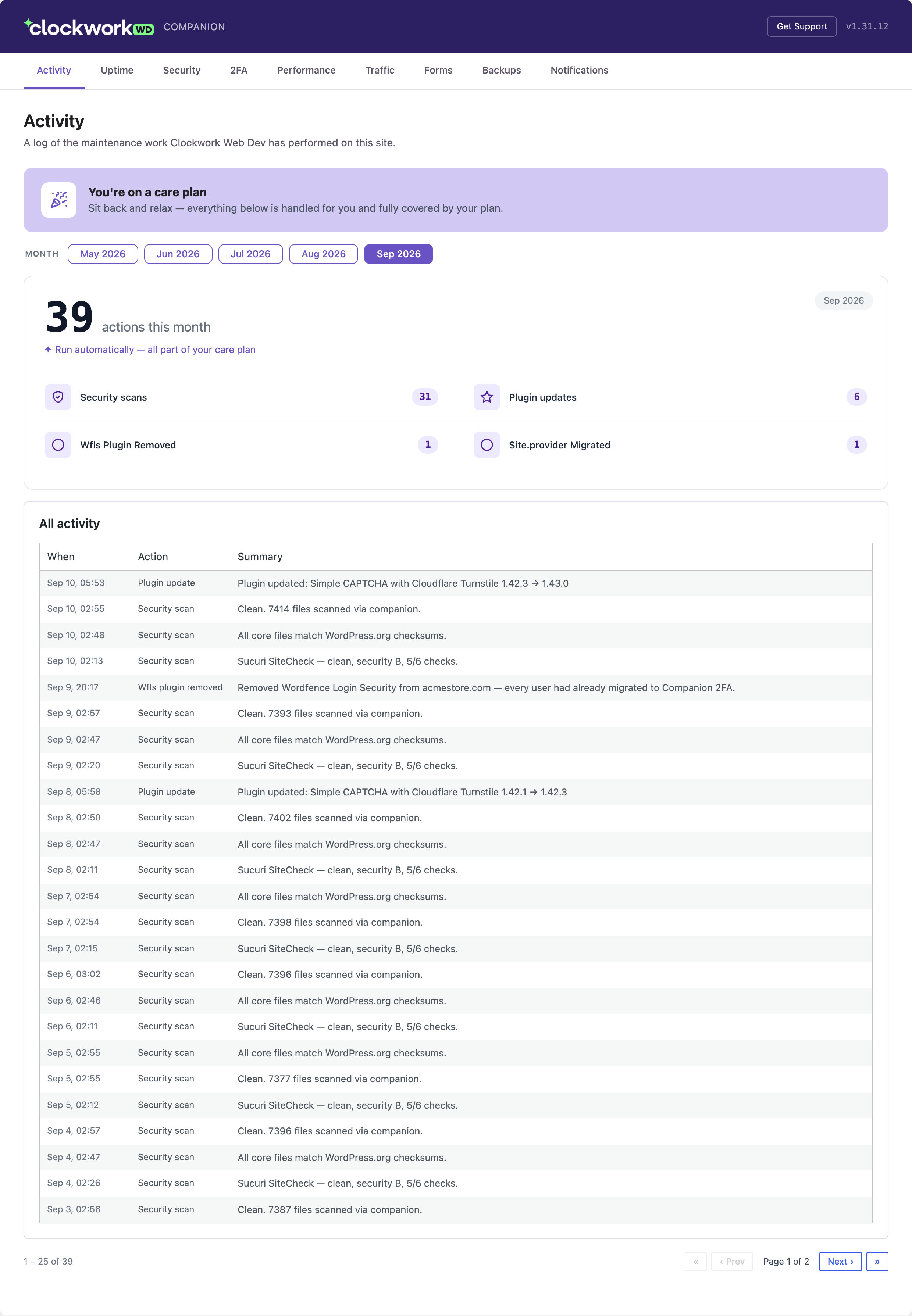
Care Plan Maintenance Log
Client TransparencyGives client administrators transparent monthly summaries of routine maintenance performed by your agency (automated security scans, core updates, safe plugin patching, and provider migrations) without exposing raw server internals.
Why Must-Use (mu-plugin) Architecture?
Standard WordPress plugins live in wp-content/plugins/ where any client with an administrator account can click "Deactivate" or delete them. Clockwork Companion lives in wp-content/mu-plugins/ for three non-negotiable reasons:
Client-Proof Persistence
Must-Use plugins (mu-plugins) do not appear with a "Deactivate" link in wp-admin/plugins.php. Client administrators cannot accidentally disable or delete your agency’s operational bridge.
Pre-Execution Priority
Loads prior to standard plugins and the active WordPress theme. Ensures clean request authentication, zero hook collisions, and immunity to broken third-party theme functions.php files.
Zero Admin Spam or Bloat
No upsell banners, no review solicitations, no affiliate marketing, and no persistent transient rows clogging up your client’s wp_options table. It remains quiet, clean, and lightweight.
Engineered for Agency Reliability & Speed
Every capability inside the Clockwork Companion is built specifically to solve daily WordPress fleet friction for agency owners and lead developers.
1-Click Passwordless SSO
Jump directly into any client’s wp-admin dashboard with one-time, cryptographically minted nonces. No shared master passwords, no password managers to synchronize, and zero credentials stored on third-party servers.
On-Disk Checksum Verification
Audits local WordPress core files directly against official WordPress.org release SHA-256 hashes on the local server filesystem. Detects unauthorized core code modifications or injected backdoors in milliseconds.
HMAC-SHA256 Signed Endpoints
Exposes clean REST routes under /wp-json/clockwork/v1/. Every request is authenticated using HMAC-SHA256 signatures with microsecond timestamp windows. Unauthorized calls are dropped before executing.
Remote Emergency Lockout Clearing
Instant fleet-wide lockout recovery without touching SSH or wp-cli. When Gatekeeper (or legacy LLAR) locks out clients or agency staff on any connected site, authorized operators can instantly unlock the IP or username remotely from the designated Agency Primary Hub over HMAC-signed REST. Client sites remain strictly isolated.
Team-Wide 2FA Governance
Enforce and manage two-factor authentication across your client’s entire team directly in WordPress. Admins can view unified team status, enforce mandatory 2FA on individual team members, clear lost setups during lockouts, and maintain emergency bypass hatches. Role-aware enrollment allows editors and authors to enroll without 403 loops.
Master Agency Palette & White-Label Lockdown
Centralized client branding hub in /settings/companion: set a master agency brand palette with 1-click cascade across wp-admin Companion chrome, Client Reports, and notification emails. Local in-WP branding editing is permanently disabled and returns 403, guaranteeing zero client tampering.
Operations Workbench
Run sandboxed PHP code snippets across client sites with RAM and execution duration logging, toggle 1-click 503 maintenance mode with secret bypass keys, and moderate comments with automated weekly spam purging.
Synthetic Contact Form Testing
Synthetically submits contact forms (Gravity Forms, CF7, WPForms, Fluent Forms, etc.) and verifies real email landing in your inbox. Fires Mattermost and Slack alerts when delivery fails.
Synchronous Plugin Upgrader
Executes plugin and theme updates synchronously using WordPress core’s native Plugin_Upgrader engine. Automatically validates site health before and after updates, prioritizing packages with known CVE vulnerabilities.
Offsite S3 Glacier Backups
Pushes verified offsite backup archives directly to the client’s wp-admin under Tools → Backups, complete with 5-day presigned S3 Glacier Instant Retrieval download links.
Zero Outbound Phone-Home Calls
Unlike third-party SaaS agents that maintain persistent WebSocket tunnels or ping cloud servers every 60 seconds, Clockwork Companion only executes when your control panel sends an authenticated request.
Master Agency Brand Palette & White-Label Hub
Located at /settings/companion, agencies can configure a unified master palette (primary_color, accent_color, surface_color, brand_text_color) and cascade it across every client touchpoint with 1 click — with zero paid add-on tiers.
One-Click Master Color Cascade
Clicking "Save & Cascade All" propagates your agency's brand colors across all three hubs simultaneously: wp-admin Companion chrome, Client Reports, and notification emails. Includes automatic two-tone contrast (--cwk-primary interactive accents paired with dark header chrome) and soft pastel backgrounds for badges without color drift.
Companion (wp-admin)
Rebrand the plugin name, description, author, company URL, support email, wp-admin menu icon and label, dashboard logo, and admin footer text. Features dedicated header title (brand_text) separate from sidebar menu entry (menu_title), Alpine.js live preview, full-page preview endpoint, and 1-click fleet sync.
• Isolated /preview endpoint
• CLI: clockwork:push-companion-branding
Client Reports Branding
Customize brand primary and accent colors for the Client Reports module inherited directly from the Master Palette or customized via individual swatches, alongside customized SLA performance commitments and personalized footer sign-offs for web and PDF executive maintenance reports.
• Custom SLA statement
• Live report preview modal
Vulnerability Alert Emails
Style outbound CVE vulnerability warning emails sent when vulnerable plugins are detected. Set header background, accent badges, sender display name, reply-to address, and care-plan callouts. Includes a real "Send test email" action with demo CVE data to verify in your actual inbox.
• Live test email dispatch
• Custom care plan notice
Transparent Client Portals • Strictly Isolated Agency Controls
Companion menus are now publicly visible to site administrators (manage_options) without old email-domain hiding hacks — while sensitive emergency tools and branding settings remain strictly locked down with fail-closed HTTP 403 protections.
What Site Administrators See
Clients and site administrators (manage_options) can now see the Clockwork Companion (or white-labeled) menu directly in their WordPress sidebar without requiring agency staff email domains:
Connection & Health Telemetry
Inspects pairing state, 256-bit connection key info, and host compatibility health.
Platform Capabilities Matrix
Transparently shows active features supported by the hosting tier and plugin version.
Team-Wide 2FA Governance
Admins view a unified team 2FA roster, require 2FA for specific users, or clear lost 2FA setups during lockout recovery. Non-admins (editors, authors) enroll safely via read capability with zero 403 redirect loops.
What Remains Strictly Isolated
Client sites never see or have access to sensitive agency operational controls. All emergency tools fail closed with HTTP 403 Forbidden:
Remote Lockout Clearing Hub
The Unlock Console only renders on the designated Agency Primary Hub (unlock_hub_domain, e.g. clockworkwd.com). Monitored client sites never see the Unlock submenu or navigation tab.
Fail-Closed Direct URL & AJAX Guards
Navigating directly to admin.php?page=clockwork-unlock immediately triggers an HTTP 403 wp_die. Background AJAX calls abort with 403 JSON errors.
Permanent White-Label Lockdown
Local in-WP branding editing (page=clockwork-branding) is permanently removed and returns 403. All branding is pushed centrally from Clockwork Control via HMAC REST.
Clockwork Companion vs. Legacy SaaS Workers
See how an agency-owned Must-Use plugin fundamentally differs from third-party vendor worker plugins (ManageWP Worker, Jetpack, MainWP Child).
| Feature & Architecture | Clockwork Companion | Legacy SaaS Worker Plugins |
|---|---|---|
| Plugin Architecture | ✓Must-Use (mu-plugin) at wp-content/mu-plugins/ | ×Standard plugin in wp-content/plugins/ |
| Client Deactivation Risk | ✓Zero. Cannot be deactivated by client admins | ×High. Any admin can click "Deactivate" or "Delete" |
| Database Overhead | ✓Zero persistent tables or transient locks | ×Heavy persistent log tables and transient bloat |
| Network Telemetry | ✓Zero phone-home calls; responds only to agency requests | ×Continuous outbound pings to vendor SaaS servers |
| Single Sign-On (SSO) | ✓Cryptographically signed, short-lived one-time nonces | ×Stored master credentials or third-party cookies |
| Agency White-Labeling | ✓Included free & 100% unlocked in core | ×Locked behind expensive monthly add-on plans |
| Source Code Auditability | ✓100% open-source single PHP file under MIT | ×Proprietary, minified, or obfuscated vendor code |
| Per-Site Monthly Cost | ✓$0.00 forever across unlimited client sites | ×$2.00 – $8.00/site/mo billed on a meter |
Zero-Touch Deployment & Canary Updates
How Clockwork Control safely rolls out and manages the Companion across dozens or hundreds of client sites with zero manual SFTP dragging.
Zero-Touch Provisioning
Clockwork Control pushes clockwork-companion.php to the client’s wp-content/mu-plugins/ directory using native SSH/SFTP runners (SpinupWP, GridPane, Cloudways, Linode) or async command APIs (Pressable).
Cryptographic Key Exchange
Clockwork Control generates a unique HMAC shared secret and stores it securely encrypted via AES-256-GCM. The site immediately begins authenticating private REST commands.
Canary Staging Validation
When updating the Companion, Clockwork Control releases to staging environments first, automatically validating REST endpoint health and PHP compatibility before touching production.
1-Click Fleet Propagation
With one click or scheduled maintenance window, roll out verified updates across your entire client fleet. If any install reports an anomaly, Clockwork Control rolls back instantly.
Inside clockwork-companion.php
No minified blobs, no hidden network phone-home sockets, and no proprietary obfuscation. Here is the elegant, readable anatomy of how the Companion operates:
<?php
/**
 * Plugin Name: Clockwork Companion
 * Description: Client-safe Must-Use operational bridge for Clockwork Control.
 * Version:     1.2.0
 * Author:      Clockwork Web Dev, LLC
 * License:     MIT
 */

if (!defined('ABSPATH')) { exit; }

// 1. Register private authenticated endpoints
add_action('rest_api_init', function () {
    register_rest_route('clockwork/v1', '/audit/checksums', [
        'methods'  => 'POST',
        'callback' => 'clockwork_verify_core_checksums',
        'permission_callback' => 'clockwork_validate_hmac_signature',
    ]);
});

// 2. HMAC-SHA256 signature and timestamp verification
function clockwork_validate_hmac_signature(WP_REST_Request $request): bool {
    $signature = $request->get_header('X-Clockwork-Signature');
    $timestamp = (int) $request->get_header('X-Clockwork-Timestamp');

    // Reject replay attacks outside 300s window
    if (abs(time() - $timestamp) > 300) { return false; }

    $secret = defined('CLOCKWORK_SECRET') ? CLOCKWORK_SECRET : get_option('clockwork_secret');
    $payload = $timestamp . '.' . $request->get_body();
    $expected = hash_hmac('sha256', $payload, $secret);

    return hash_equals($expected, (string) $signature);
}Agency Questions Answered
Does the Clockwork Companion slow down client websites?
No. The Clockwork Companion introduces zero front-end overhead. It does not run background wp-cron tasks, does not inject front-end tracking scripts, and does not execute database queries during normal visitor page requests. It only executes when responding to an authenticated management request from Clockwork Control.
Why deploy as an mu-plugin instead of a standard plugin?
Standard plugins can be deactivated or deleted by client administrators, breaking your agency’s monitoring and maintenance automation. Must-Use plugins (mu-plugins) load automatically for every site, cannot be disabled from the WordPress admin interface, and execute earlier in the WordPress bootstrap lifecycle.
Can we white-label the plugin name and admin menu?
Yes. Clockwork Control provides full white-label settings. You can brand the menu item (e.g. Tools → Acme Agency Care), company logo, support URL, and diagnostic details so your clients see your agency’s brand with zero mention of third-party vendors.
How does deployment work on hosting without SSH access?
For hosts that provide zero SSH access (such as Pressable), Clockwork Control utilizes the hosting provider’s native asynchronous command execution endpoints (e.g. run_site_bash_commands and run_site_wpcli_commands) to write and update the mu-plugin file without needing an SSH user.
How does 1-Click SSO authenticate without passwords?
When an operator clicks "Log into wp-admin" from Clockwork Control, the control panel issues a short-lived, single-use cryptographic token signed with your agency’s HMAC secret. The Companion verifies the signature and timestamp, logs in the designated administrator user, and immediately expires the nonce.
What do client site administrators see in their WordPress dashboard?
All site administrators (users with manage_options) can see the Clockwork Companion (or custom white-labeled) menu in their sidebar, providing visibility into Connection health, Capabilities, vulnerability Notifications, and Login Security / 2FA. Sensitive agency tools (such as the Lockout Unlock Hub and white-label branding controls) remain completely hidden and fail-closed with HTTP 403.
How does the Remote Lockout Unlock Hub work without SSH or credentials?
When Gatekeeper (or legacy LLAR) locks out clients or agency staff on any connected site, authorized operators can instantly unlock the IP or username remotely from the designated Agency Primary Hub console (Clockwork Companion → Unlock). The request is cryptographically signed (HMAC-SHA256) and verified on the target site via DELETE /wp-json/clockwork/v1/lockouts, flushing the block in milliseconds without SSH or wp-cli.
Deploy zero-bloat WordPress control
for your agency fleet today
No per-site subscription fees. No cloud vendor locks. Run Clockwork Control locally on your Mac Mini or office server and manage your entire WordPress fleet with total confidence.
